
Last updated on
Nov 7, 2026

VA VSA 66 2016-2026 free printable template
pdfFiller is not affiliated with any government organization

Fill out
Complete the form online in a simple drag-and-drop editor.

eSign
Add your legally binding signature or send the form for signing.

Share
Share the form via a link, letting anyone fill it out from any device.

Export
Download, print, email, or move the form to your cloud storage.
Why pdfFiller is the best tool for your documents and forms


End-to-end document management
From editing and signing to collaboration and tracking, pdfFiller has everything you need to get your documents done quickly and efficiently.
Accessible from anywhere
pdfFiller is fully cloud-based. This means you can edit, sign, and share documents from anywhere using your computer, smartphone, or tablet.
Secure and compliant
pdfFiller lets you securely manage documents following global laws like ESIGN, CCPA, and GDPR. It's also HIPAA and SOC 2 compliant.
What is VA VSA 66
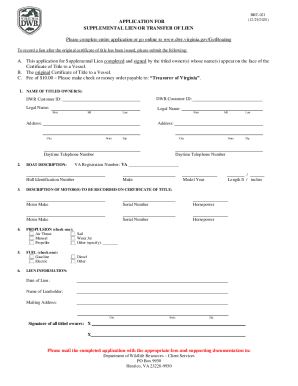
The VSA 66 Transfer and Supplemental Liens is a government form used by vehicle owners in Virginia to apply for a lien transfer or supplemental lien on a vehicle.
pdfFiller scores top ratings on review platforms




Still getting use to using PDFFiller. I like to use it filling out forms.
So far it works great! There's a bit of a learning curve, but I was able to chat with a support rep even though it was late at night. He helped explain how I could achieve my goals for our Robotics team engineering notebook forms.
Who needs VA VSA 66?
Explore how professionals across industries use pdfFiller.

VA VSA 66 is needed by:
-
Vehicle owners seeking a lien transfer
-
Co-owners of a vehicle
-
Current lienholders wishing to transfer liens
-
New lienholders acquiring a lien
-
Individuals involved in vehicle financing
Comprehensive Guide to VA VSA 66
Overview of the VSA 66 Transfer and Supplemental Liens
The VSA 66 form is a critical document for vehicle owners in Virginia, utilized to apply for a lien transfer or a supplemental lien on a vehicle. Its primary function is to facilitate the proper transfer of ownership and financial interests associated with vehicles. Understanding the significance of the VSA 66 form ensures compliance with Virginia state regulations during vehicle transactions.
This form streamlines the process of documenting ownership changes, providing security for both current and new lienholders. By utilizing the VSA 66 form, individuals safeguard their financial interests in the vehicle being transferred.
Purpose and Benefits of the VSA 66
Individuals seeking to transfer a vehicle lien or apply for a supplemental lien find the VSA 66 form indispensable. The primary reasons for needing this form include changes in ownership, as well as ensuring that all financial obligations are appropriately documented.
By completing the form through pdfFiller, users gain substantial advantages. The platform offers ease of use, enhanced security, and the convenience of filling out documents online, ensuring that the information is accurately submitted.
Who Needs to Complete the VSA 66 Form?
Various parties are required to sign the VSA 66 form, each playing a crucial role in the process. This includes the owner, co-owner, current lienholder, and new lienholder, all of whom must provide their signatures to authenticate the transfer.
Eligibility requirements differ for each role. For example, the current lienholder must verify their interest in the vehicle, while the new lienholder affirms their intention to assume this financial responsibility. Each signature ensures transparency and compliance with Virginia vehicle laws.
How to Fill Out the VSA 66 Form Online (Step-by-Step)
Filling out the VSA 66 form online with pdfFiller can be easily accomplished by following these steps:
-
Access the VSA 66 form on pdfFiller.
-
Enter the owner's full legal name, including last, first, middle, and suffix.
-
Complete the required fields, such as contact information and vehicle details.
-
Sign the form electronically, ensuring all mandatory signatures are completed.
-
Review the information to confirm accuracy before final submission.
Important fields to pay attention to include 'Owner Full Legal Name' and 'Current Lienholder's Information'. Properly filling out these fields is essential for a successful vehicle lien transfer.
Common Mistakes to Avoid When Completing the VSA 66
When preparing to submit the VSA 66 form, individuals often encounter typical errors that can delay processing. Common mistakes include missing signature fields, incorrect vehicle identification numbers, and errors in contact details.
To ensure submission accuracy, follow these best practices:
-
Double-check all entered information for completeness and correctness.
-
Verify that all required signatures are present.
-
Utilize validation features on pdfFiller to confirm that all sections are completed properly.
Submission Methods for the VSA 66
Upon completing the VSA 66 form, individuals have several options to submit it. These methods include:
-
Submitting in person at a DMV customer service center.
-
Sending the form by mail to the Titling Work Center.
-
Utilizing any online submission options if available.
Prior to submission, ensure that you inquire about any associated fees required for processing to avoid delays.
What Happens After You Submit the VSA 66?
After submitting the VSA 66 form, applicants can expect a confirmation of receipt from the DMV. Processing times can vary, so it’s prudent to check the DMV website for estimated timelines.
To track the status of your application post-submission, keep your receipt and any tracking information handy. This allows for easy follow-up if needed.
Security and Compliance in Handling the VSA 66
When completing the VSA 66 form, users can rest assured that their information is secure when using pdfFiller. The platform offers various security features, including encryption and compliance with regulations like HIPAA and GDPR.
To further protect sensitive information during the lien transfer process, users should consider the following tips:
-
Always use secure passwords for your online accounts.
-
Avoid sharing personal information through unsecured channels.
-
Regularly review documents for accuracy before submission.
Get Started with pdfFiller to Complete Your VSA 66 Form
Utilizing pdfFiller for completing the VSA 66 form provides numerous benefits. Its user-friendly interface, comprehensive security features, and direct support make the process straightforward and efficient.
Explore the platform's additional resources, including tutorials and customer support, to maximize your experience with the VSA 66 form and ensure a smooth vehicle lien transfer.
How to fill out the VA VSA 66
-
1.To access the VSA 66 form on pdfFiller, visit their website and use the search function to find 'VSA 66 Transfer and Supplemental Liens'.
-
2.Once located, click on the form to open it in the pdfFiller interface.
-
3.Before starting to fill out the form, gather essential information, including the owner's full legal name, vehicle details, and current lienholder information.
-
4.Begin completing the form by entering the owner's full legal name as required in the designated field.
-
5.Fill in the contact information, including the telephone number, ensuring all entered data is accurate and up-to-date.
-
6.Next, specify the details for the current lien and new lienholder, using the provided fields to ensure clarity.
-
7.Check the appropriate boxes as instructed within the document to indicate the relevant application type.
-
8.After all fields are filled, carefully review the entire form for accuracy and completeness, ensuring that each required signature line is prepared for the respective signatories.
-
9.To finalize the document, utilize pdfFiller's features to save your changes, ensuring you retain a copy for your records.
-
10.You have the option to download the filled form for physical submission or submit it directly through pdfFiller if this feature is supported.
-
11.If mailing, ensure it goes to the DMV customer service center or the Titling Work Center as per submission guidelines, including any applicable fees.

Who is eligible to use the VSA 66 form?
The VSA 66 form is designed for vehicle owners, co-owners, current lienholders, and new lienholders in Virginia. Anyone involved in the vehicle’s lien transfer process can use this form.
What documents do I need when filling out the VSA 66?
You will need the owner's full legal name, vehicle information, current lien details, and signatures from all parties involved in the lien transfer, including co-owners and lienholders.
How do I submit the VSA 66 form?
You can submit the VSA 66 form by mailing it to the DMV Titling Work Center or submitting it in person at a DMV customer service center along with any applicable fees.
What are common mistakes to avoid when completing the form?
Common mistakes include incomplete fields, missing signatures, and incorrect information. Always double-check that all parties have signed and all required data is accurate before submission.
What is the processing time for the VSA 66 form?
Processing times can vary based on submission volume and method. Typically, it may take several weeks, so plan accordingly to avoid delays.
Is notarization needed for the VSA 66 form?
No, notarization is not required for the VSA 66 Transfer and Supplemental Liens form. However, all required parties must sign in designated areas.
What if I make an error on the VSA 66 form?
If you notice an error after filling out the VSA 66 form, it is advisable to start a new form. Crossed-out or corrected information could lead to processing delays.
VA VSA 66 Form Versions
Related Content
Related Forms




Get the latest insights from our blog


If you believe that this page should be taken down, please follow our DMCA take down process
here
.
This form may include fields for payment information. Data entered in these fields is not covered by PCI DSS compliance.